Watercolor Brushes for AI: Unlocking Creative Potential
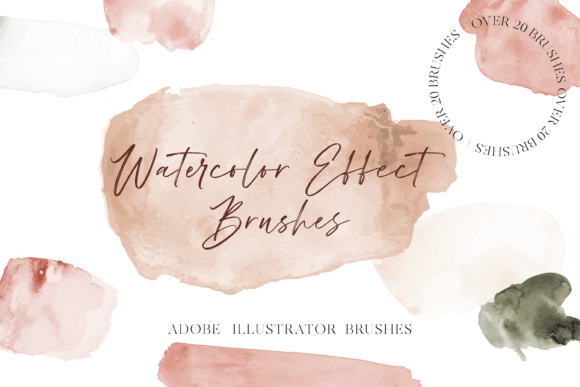
Adding a hand-painted, organic feel to digital work is one of the most effective ways to connect with an audience on a human level. The Watercolor Brushes for Adobe Illustrator set is a specialized collection of design assets built specifically for this purpose. It offers 35 distinct brushes designed to mimic the fluidity, texture, and unpredictable beauty of real watercolor paint. This isn't a static image overlay; it's a dynamic toolset that integrates directly into your workflow. The collection includes 25 stroke brushes where the color is fully adjustable, giving you control over the palette, and 10 color brushes that maintain their original pigment for more specific effects. Compatible with Adobe Illustrator CC, this kit is engineered for professionals who need reliable, high-quality tools for commercial font and graphic projects.
The Anatomy of a Realistic Watercolor Effect
Understanding the composition of this brush set is key to using it effectively. The 25 stroke brushes are the workhorses of the collection. Because their color is changeable, you can seamlessly integrate them into any brand palette or project color scheme. Imagine creating a custom logo design where the accent marks or background textures are rendered in a soft, watery wash that perfectly matches the primary brand colors. This level of control is essential for maintaining a cohesive brand identity. The 10 color brushes, with their fixed colors, are perfect for adding specific, ready-made elements. These might include a classic cadmium yellow sunburst, a deep crimson bleed, or a muted teal wash. They work exceptionally well as standalone backgrounds for social media graphics or as accent layers in editorial design.
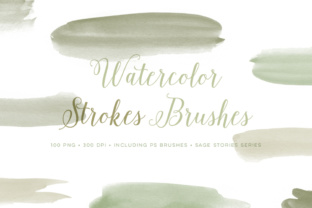
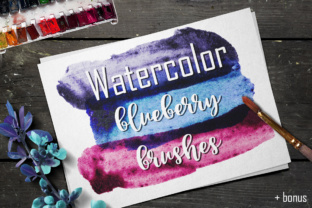
The visual character of these brushes is authentically textured. You’ll see the subtle granulation of pigment settling into the tooth of the paper, the soft, feathery edges where water evaporates, and the unpredictable bleeds that make watercolor so charming. This realism is what separates a premium design asset from a generic filter. It adds depth and a tactile quality to flat, digital surfaces. For a packaging design for a artisanal product, a watercolor background immediately communicates a sense of craftsmanship and care. In web design, a subtle watercolor texture can soften a layout, making it feel more inviting and less sterile, which can significantly improve user engagement and time on page.
Practical Applications: From Digital Canvases to Physical Products
The true value of Watercolor Brushes for AI lies in their versatility across a spectrum of projects. For entrepreneurs and small business owners, these brushes are a secret weapon for creating professional, eye-catching marketing materials without a steep learning curve. Use them to design unique gift tags, thank you cards, or promotional flyers that stand out in a crowded marketplace. The organic texture instantly elevates a simple design, making it feel more valuable and thoughtfully crafted. Bloggers and content creators can leverage these brushes to create stunning featured images, custom quote graphics, or illustrated headers that capture a reader's attention and set the tone for their content.
For designers and illustrators, the applications are even more expansive. The brushes are perfect for building up complex illustrations with a natural, painterly style. You can layer different stroke brushes to create depth, use the color brushes for quick background washes, and combine them with Illustrator's native tools for a hybrid digital-traditional look. This is particularly useful in editorial design for magazines or book covers where a bespoke, artistic feel is required. The texture also plays a crucial role in visual hierarchy. A watercolor accent behind a headline can draw the eye without overwhelming the text, guiding the reader through the layout in a subtle, intuitive way. When used consistently, these textures become a recognizable element of a brand's visual language, enhancing brand perception as creative, approachable, and detail-oriented.
Integrating These Brushes into a Professional Workflow
Getting started is straightforward, thanks to the included installation and saving instructions. However, a few professional insights can help you maximize their impact. First, always work on a separate layer. This non-destructive approach allows you to adjust the opacity, blending mode, or position of your watercolor elements without affecting the underlying artwork. Experiment with Illustrator’s blending modes like Multiply, Overlay, or Soft Light to see how the watercolor interacts with the colors and textures beneath it. This can create beautiful, complex effects that are difficult to achieve otherwise.
Consider font pairing carefully. The fluid, organic nature of watercolor textures pairs exceptionally well with clean, simple typefaces. A modern sans-serif font or a classic serif font provides a perfect counterbalance, ensuring your message remains clear and readable. Avoid pairing watercolor elements with overly decorative script fonts or handwritten fonts, as the competing organic styles can create visual clutter and harm readability. The goal is contrast and balance. For a cohesive brand identity, establish rules for how and where these textures are used—perhaps only for accent backgrounds, specific icons, or certain social media templates. This ensures consistency across all touchpoints, from digital ads to printed materials.
Before finalizing any project, test how your design translates across different formats. A watercolor background that looks beautiful on a website banner might lose its nuance when printed on a small business card. Conversely, a subtle texture on a printed brochure might not be visible on a low-resolution screen. By thinking through these practical applications and technical considerations, you can transform the Watercolor Brushes for AI from a simple novelty into a cornerstone of your creative toolkit, enabling you to produce work that is not only visually stunning but also strategically effective.