Watercolor Photoshop Brushes: 25 Designs to Add Organic Texture
When you’re working on a project that needs a human touch, digital perfection can sometimes feel cold. We often look for ways to break the grid and introduce elements that feel handmade and organic. That is where high-quality design assets come into play. If you have been searching for a way to infuse warmth, color, and artistic flair into your digital work, the Watercolor Photoshop Brushes set is a resource you need to know about. It bridges the gap between traditional art and modern digital design, offering a massive library of tools that simulate the look of real paint.
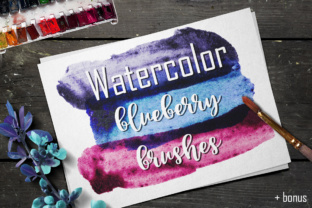
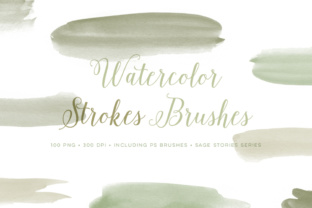
This collection is substantial. You aren't just getting a handful of options; you are gaining access to 25 different paint stroke designs. These aren't static shapes. They capture the fluidity and unpredictability of watercolor, including the way pigment bleeds, pools, and dries with unique texture. To make this set even more versatile, it includes a massive bonus package of 100 PNG images. This breaks down to the 25 designs available in four distinct color variations. Whether you are a seasoned designer or a hobbyist, this set gives you the flexibility to add color, texture, and finesse to any creative project instantly.
Bringing Organic Energy to Modern Typography
In the world of modern typography, contrast is king. We often pair sleek, geometric sans serif fonts with rough, textured elements to create visual interest. This is exactly where these watercolor brushes shine. They allow you to create backgrounds, overlays, and decorative elements that soften the hard edges of standard digital layouts. If you are working on a brand identity for a wellness coach, a coffee shop, or a boutique clothing line, these brushes provide the perfect aesthetic foundation.
Consider how you might use these assets alongside different typefaces:
- With Serif Fonts: A classic serif font often conveys tradition and reliability. By adding a watercolor wash behind headlines, you can make the layout feel more approachable and less rigid. This works exceptionally well for editorial design and book covers.
- With Sans Serif Fonts: Clean, modern sans serif font families benefit from the texture of watercolor to add depth. Imagine a minimal web design where the call-to-action button has a subtle watercolor background to draw the eye without shouting.
- With Script and Handwritten Fonts: These script font and handwritten font styles already have a personal feel. Pairing them with watercolor strokes reinforces the artisanal vibe, perfect for packaging design or wedding invitations.
The key is to use the watercolor elements to support the text, not overpower it. By using the PNG files or the brushes at varying opacities, you can create a layered effect that adds sophistication to your logo design or social media assets.
Practical Applications for Designers and Creators
The true value of Watercolor Photoshop Brushes lies in their versatility. Because the download includes both ABR files (for use directly in Photoshop) and PNG files, you can use them in almost any software, including Canva, Procreate, or Affinity Designer. This makes them an essential part of your library of design assets.
Digital Marketing and Social Media
For marketers and content creators, standing out in a crowded feed is difficult. Stock photos often look generic. By applying a watercolor texture over an image or using a paint stroke as a banner for text, you create a custom look that feels curated. These brushes are excellent for creating cohesive social media graphics. You can maintain a consistent color palette by using the pre-colored PNGs or by sampling your brand colors and painting directly with the brushes.
Publishing and Editorial Work
If you are involved in publishing, you know that chapter headers and pull quotes need to catch the reader's eye. Using a display font is standard practice, but adding a watercolor element behind the text can elevate the reading experience. It adds a tactile quality to digital magazines and PDF lookbooks that standard formatting lacks.
Product Packaging
In packaging design, the "unboxing" experience matters. Watercolor textures suggest natural ingredients, handmade processes, and care. Whether you are designing labels for jam jars or boxes for cosmetics, the soft edges of these paint strokes convey a message of quality and gentleness. This is particularly effective when paired with a premium font that has high legibility.
Working with the Assets: Tips for Best Results
Having the files is one thing; using them effectively is another. To get the most out of this set, you need to treat them like real paint. Here are some practical guidelines for integrating them into your workflow:
- Layering and Blending: Don't just stamp a brush on a layer and leave it. Use Photoshop’s blending modes. "Multiply" is excellent for making the white background disappear, leaving only the paint texture. "Overlay" or "Soft Light" can add a subtle tint to photographs.
- Color Adjustments: While the set includes 100 pre-colored PNGs, you aren't limited to those hues. Use "Hue/Saturation" adjustments or "Color Balance" to shift the watercolor strokes to match your specific brand identity palette.
- Scale and Resolution: These brushes are high-resolution, meaning you can scale them up for large print projects like posters or signage without losing quality. However, be mindful of the grain; scaling up too much can make the texture look softer than intended.
- Combining Elements: Try overlapping two different stroke designs. Since watercolors are translucent by nature, layering two colors creates a third, richer tone. This technique adds realism to your digital art.
Evaluating Fit for Your Project
Before you start painting, take a moment to evaluate if this style fits your current task. Ask yourself what emotion you want to evoke. If you are designing for a law firm or a cybersecurity company, the fluidity of watercolor might clash with the need for rigid precision and trust. However, for industries like food, beauty, travel, education, and lifestyle, the organic nature of watercolor is a perfect match.
Think about readability. If you are placing text over a watercolor wash, ensure there is enough contrast. A dark serif font over a light pastel wash usually works best. If the texture is too busy, the text gets lost, and your message fails. Use the brushes to create "quiet zones" where the paint is lighter, allowing the typography to breathe.
Finally, consider the commercial aspect. This set is designed for both personal and commercial use, making it a safe investment for freelancers and agencies. You can use these assets in client work, products for sale, and marketing materials without worrying about licensing issues. It is a creative font companion that solves many visual problems, saving you time hunting for textures or trying to paint them yourself from scratch.
In summary, the Watercolor Photoshop Brushes