Procreate Face Stamps: A Designer's Shortcut to Consistent Illustrations
There's a particular kind of creative friction that happens when you're building a brand or a series of social media graphics. You have a great concept, a solid color palette, and a clear message, but the execution stalls. For many creators, the bottleneck is character illustration. Drawing a consistent, appealing face time and again is a skill that takes years to master. This is where a tool like the Procreate Face Stamps set becomes less of a novelty and more of a strategic asset for your workflow.
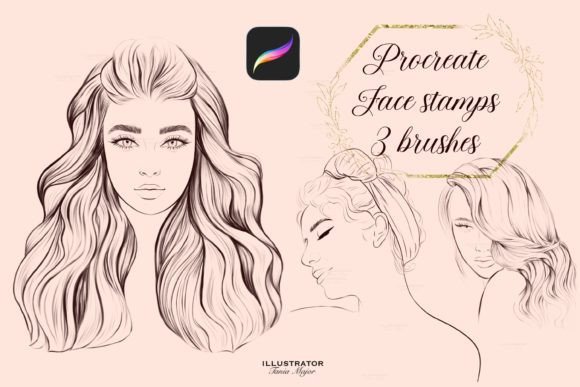
Let's be clear about what this is. It's a small, focused set of three Procreate brushes designed for the iPad app. The term "stamp" is literal. You select the brush, tap your screen once, and a complete, stylized face appears on its own layer. This isn't a complex vector library; it's a digital design asset built for speed and personality. The visual style leans into a modern, feminine aesthetic—think fashion illustration meets stylized portraiture. The lines are clean, the expressions are neutral yet engaging, and the overall feel is polished without being overly realistic. This makes them incredibly versatile for a range of projects where a human touch is needed, but a full-blown illustrated character isn't required.
Where These Stamps Truly Shine
The real value of these Procreate face stamps lies in their application across diverse creative projects. They aren't a replacement for a custom-illustrated brand identity, but they can be a powerful component of one, especially for businesses and creators who need to produce a high volume of visual content.
Consider a small business owner creating product mockups. Instead of using a generic, overused stock photo model, they can stamp a face onto a flat-lay illustration of a skincare product or a piece of jewelry. This instantly adds a layer of personality and originality. For social media graphics, the applications are immediate. A blogger can create a series of Instagram posts or Pinterest pins with a consistent character, reinforcing their visual identity without spending hours on each piece. The ability to change the color and size of the stamp means it can be adapted to fit any color palette or layout, from a tiny icon to a prominent header element.
For those in editorial design, such as creating digital magazines or lookbooks, these stamps offer a quick way to add spot illustrations or avatars. In the realm of personal projects, they're perfect for crafting custom stationery, journaling, or even designing simple, personalized gifts. The key is understanding their role: they are a creative font for your visual language, a quick way to insert a specific mood or character into a design.
Integrating Stamps into a Professional Workflow
Adopting any new design asset requires a bit of strategy. The first step is always to test. Download the brush file, import it into your Procreate app (remember, it requires Version 5 or higher), and experiment. Play with layer blending modes. Try clipping a texture layer to the stamped face to give it a more tactile, printed feel. See how it interacts with other Procreate brushes you already use, like your favorite script font or sans serif font brush for lettering.
Think about visual hierarchy. A stamped face can act as a focal point, drawing the eye in a busy composition. It can also serve as a secondary element, adding a subtle human presence to a background pattern. Because the style is consistent, using the same stamp across a series of graphics—say, for a marketing campaign or a blog series—builds instant recognition. This is the essence of building a cohesive brand identity through thoughtful design choices.
A practical tip for ensuring professionalism is to never use the stamp in its raw, black-and-white state for a final project unless that fits your monochrome aesthetic. Always customize the color to match your project's palette. This simple step transforms it from a generic clipart element into an integrated part of your design. Consider the context of your project. For a sophisticated, high-end brand, you might use the stamp sparingly, perhaps as a subtle watermark or a small icon. For a playful, youthful brand, it could be a bold, colorful centerpiece. This is the difference between using a premium font appropriately and just slapping it on a page.
Ultimately, tools like the Procreate Face Stamps are about efficiency and consistency. They solve a specific problem for creators who need to produce engaging, human-centric visuals quickly. They won't teach you how to draw, but they will help you communicate a style and mood effectively, freeing up your time to focus on the broader strategic goals of your project. In a digital landscape where authentic connection is key, having a reliable way to add a personal touch is a significant advantage.